Bringing your history
Coming from Jellystat, Streamystats or Tautulli? Your history comes with you, from any of them.
Jellystat:
- Open Settings → Backup
- Select only Activity (it turns purple)
- Under settings click Settings, scroll to the end and start a backup
- Go back to Backups, open Actions on the new backup and click Download
Streamystats: open Settings → Backup & Import, scroll down to Backup & Restore and click Download Backup.
Tautulli (coming from Plex):
- Open Settings → Import & Backups and click Backup Database. Tautulli saves the backup on the machine it runs on; nothing downloads to your browser.
- Find it in Tautulli's
backupsfolder, inside its data folder. With Docker that isbackupsinside the folder you mounted as/config(for example/opt/tautulli/config/backups); with a native install, inside the data folder Tautulli was installed with. - Take the newest
tautulli.backup-….dbor….db.zip(the scheduled ones,….sched.db.zip, work the same). Leave theconfig.backup-…files: they are Tautulli's settings, not its history. - Copy it to the computer you are using, with
scp, a shared folder or your NAS's file manager.
In finstats, open Settings → Import, find the card for the one you used, and drop the file in.
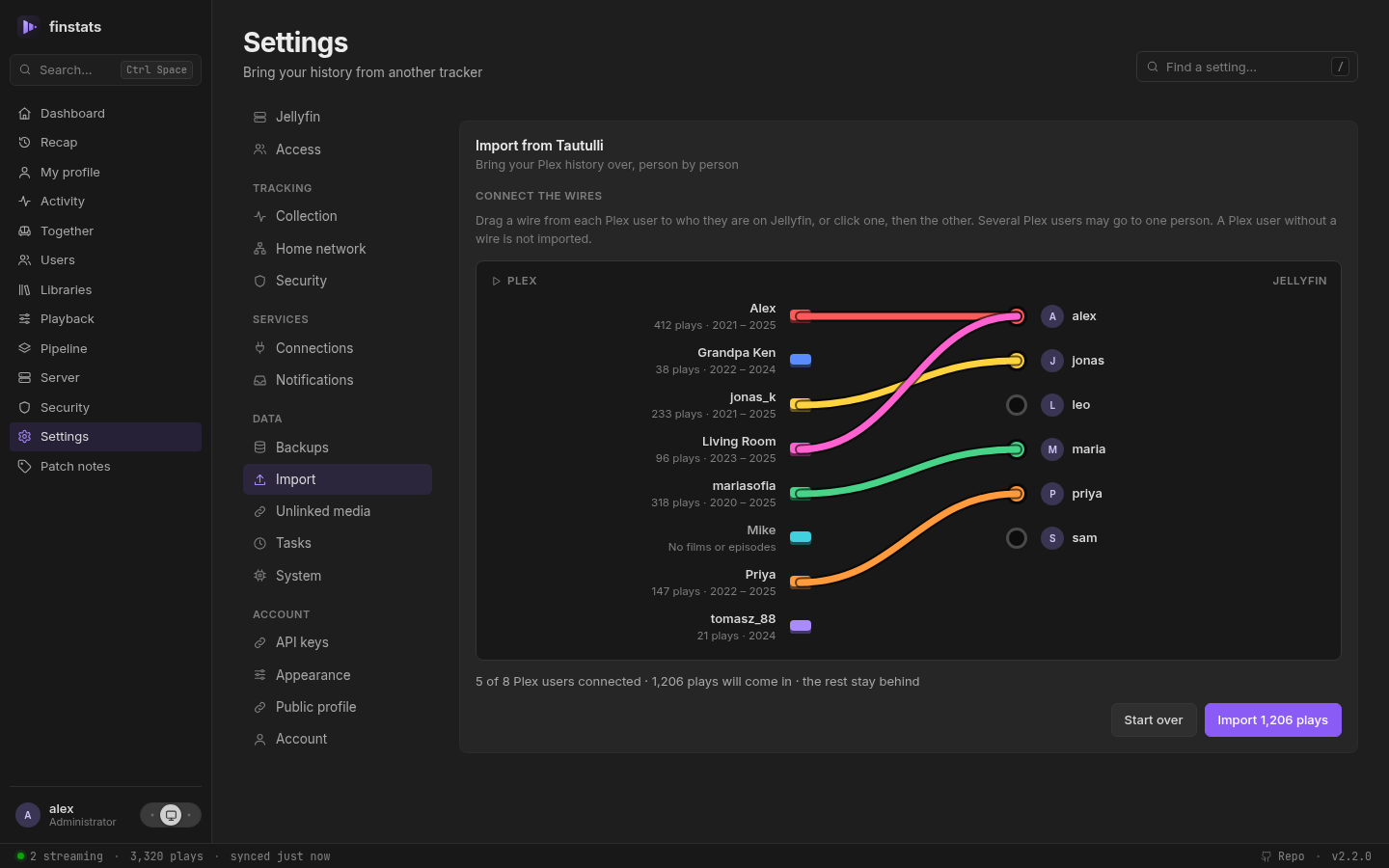
From Tautulli you say who is who. Plex names rarely match Jellyfin's, so the upload becomes a wiring board: Plex users on one side, Jellyfin users on the other. Drag a wire from each Plex user to who they are now, or click one, then the other. Anybody you leave unwired is not imported, and two Plex accounts can go into one person. Films and episodes are matched to your library by name; music is left out. Anything it cannot place (a film Plex called something else) waits under Settings → Unlinked media with its likeliest match already found, one Locate away.
Ran both? Import both files. Nothing is counted twice: finstats recognises a play it already has, whichever tracker brought it in and whether or not it watched that evening itself.
Large backups are no problem (a 350 MB file imports in a few seconds), and importing the same file twice is safe. One thing to know: neither tracker recorded what happens during a play, so imported history has no pause-and-skip timelines. Everything finstats records from now on does. How Jellystat data is interpreted → · How Streamystats data is interpreted → · How Tautulli data is interpreted →